Borderless Fullscreen-Expander
A downloadable utility
Fullscreen Expander - User Manual
1. Installation
Windows:
- Download the
FullscreenExpander.exefile - Place it in any folder (no installation required)
- Double-click to run
2. How to Use
Step 1: Launch the Application
- Open
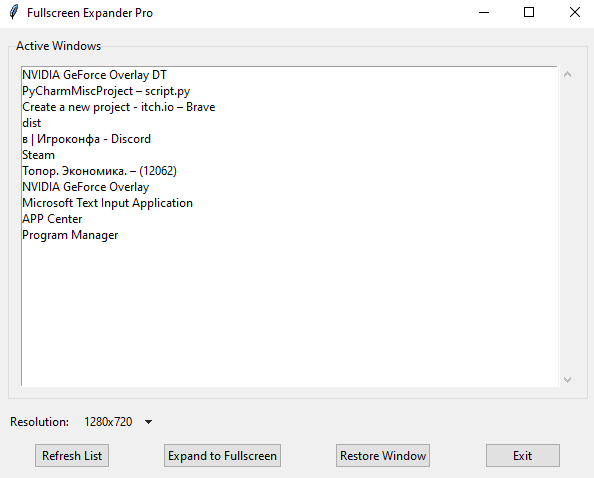
FullscreenExpander.exe - The main window will show all currently open applications
Step 2: Select a Window
- Find your application/game in the "Active Windows" list
- Click to select it
🔄 If your window isn't listed: Click "Refresh List" to update
Step 3: Choose Resolution
From the dropdown menu, select:
- Standard resolutions (720p, 1080p, 1440p)
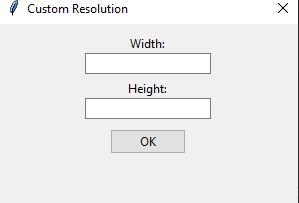
- "Custom" to enter manual values
Step 4: Expand to Fullscreen
Click "Expand to Fullscreen" to: ✔️ Remove window borders ✔️ Set your chosen resolution ✔️ Center the window perfectly
💡 For games: This creates a seamless "fake fullscreen" mode with better alt-tab performance than true fullscreen.
Step 5: Restore (Optional)
To revert changes:
- Select the window again
- Click "Restore Window"
3. Key Features
For Gamers
🎮 Play borderless windowed mode at any resolution ⚡ Reduce alt-tab lag vs. traditional fullscreen 📌 Perfect for streaming/recording
For Productivity
🖥️ Remove distracting window borders 📏 Force apps to your preferred size 🔍 Center windows automatically
4. Troubleshooting
| Issue | Solution |
|---|---|
| "Window not found" error | 1. Refresh the list 2. Ensure the window isn't minimized |
| Resolution not applying | Try running as Administrator |
| Black screen in games | Restore window, then disable in-game fullscreen first |
| FPS drops | Use your monitor's native resolution |
5. Uninstallation
Simply delete the FullscreenExpander.exe file. No leftover files or registry entries.
Download
Click download now to get access to the following files:
Leave a comment
Log in with itch.io to leave a comment.